Command Palette & Shortcuts
The search box in the top right of the web console can be opened anytime with ⌘K (macOS) / Ctrl+K (Windows / Linux) — the fastest way to work on desktop. Type or use arrow keys instead of clicking through menus.
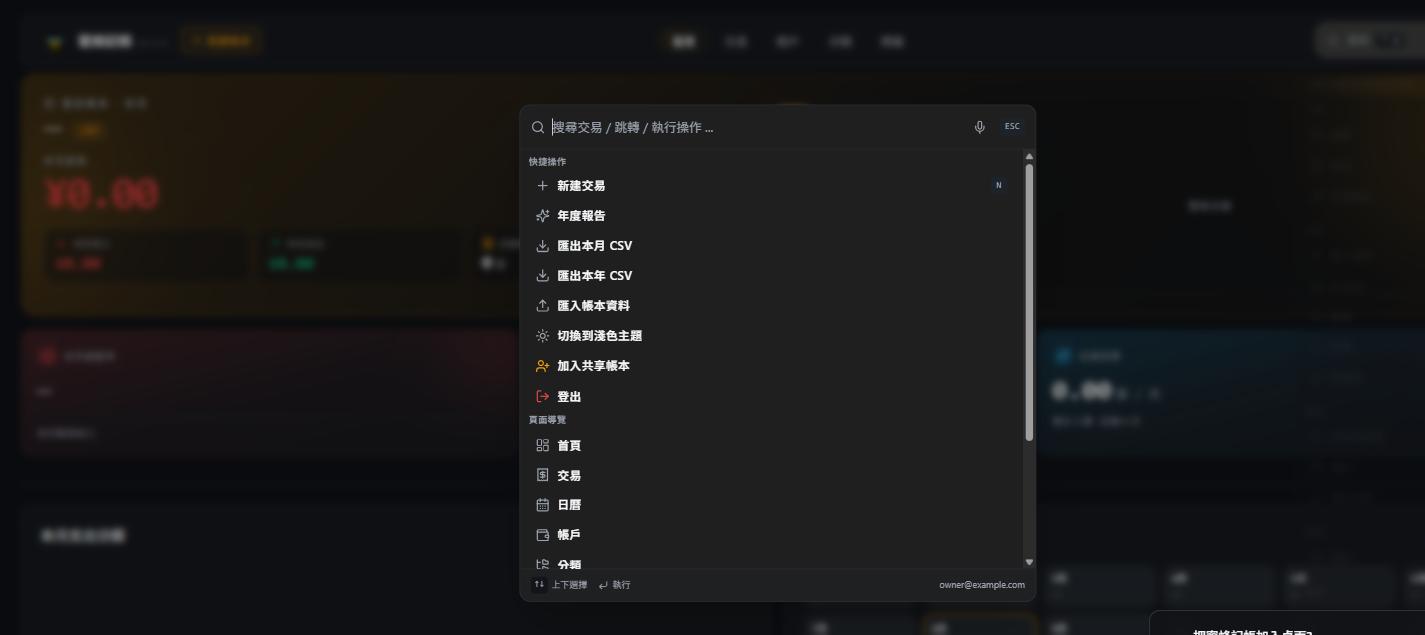
Opening it
- Keyboard shortcut
⌘K/Ctrl+K(works from any page) - Click the search box in the top right
Press Esc to close, ↑↓ to move between options, Enter to run.
Quick actions
The "Quick actions" section at the top lets you run these anytime:
| Action | Notes |
|---|---|
| New transaction | Shortcut N, opens the record dialog directly |
| Annual report | Opens the year-in-review (12 immersive slides) |
| Export this month / year as CSV | Downloads the current ledger's transactions |
| Import ledger data | Opens the import data dialog |
| Switch to light / dark theme | Same as the theme toggle in the avatar menu |
| Join a shared ledger | Enter an invite code to join someone's shared ledger |
| Sign out | Log out of the current account |
Page navigation
Jump straight to any main page — Home, Transactions, Calendar, Accounts, Categories, Tags — without clicking through the top nav.
Searching transactions
Type a keyword directly in the search box (note, category name, amount) and the palette lists matching transactions live; press Enter to open one directly — faster than going to the transaction list and filtering.
Tips
- Pressing
Nto record is faster than clicking through to the top nav, especially once you're used to keyboard-driven workflows - Reconciling at month end:
⌘K→ type "export" → Enter, no need to hunt for the entry point in settings - The palette can also answer questions about how to use BeeCount — see AI chat